Powered by Vynex AI

Generate AI images & videos in bulk, across every account you own.

Vynex Studio is a desktop app that turns a list of prompts into a folder of finished images and videos — driving Gemini, Google Labs Flow, and Flow Video (Veo) across many signed-in profiles, in parallel, quietly in the background. Plus built-in Image Compression, Watermark Remover, a YouTube Video Downloader, a YouTube Thumbnail Downloader, Trending Channels niche research, and a local API.

Windows installer — one-click setup Images & videos 3 AI engines Built-in Tools — local, no API key Runs headless
Vynex Studio dashboard
3AI engines
Profiles in parallel
100%Background / headless
AutoRetries & rotation
Vynex Studio

Get Vynex Studio

Enter your name and email — we'll send your license key and download link straight to your inbox. Free Windows installer build.

One license per machine. We only use your email to deliver the app and important updates.

View all releases & build history · API documentation

Features

Everything you need to mass-produce media

Built for creators running real volume — generation, compression, cleanup, and downloads in one app.

Two engines, one app

Switch between Gemini and Google Labs Flow (Nano Banana, Imagen) with a single click. Each prompt batch runs on the engine you choose.

Many profiles in parallel

Each Google account is a persistent browser "device". Vynex Studio runs several at once as concurrent workers and rotates through them round-robin.

Runs in the background

Headless by default — no browser windows flashing on screen. Flip to "Show browser windows" anytime to watch it work.

Smart retries & cooldowns

Failed generations are retried automatically. Profiles with high fail rates get a penalty cooldown so reliable accounts do more of the work.

Per-engine statistics

Lifetime generated / failed / success-rate tracked per profile, per engine — so you always know which accounts are healthy.

Flexible prompt input

Paste prompts (paragraphs, numbered lists, or Scene tags) or drop in .txt / .json files. Skips prompts that already have an image.

You control the output

Pick any output folder. Name files by number (1.jpg) or by the first words of the prompt. Images save flat — no nested folders.

Stays logged in

Sign in once per account; sessions persist across runs until you log out. A live toast walks you through each login.

Flow Video generation (Veo)

Text-to-video across 4 models — Omni Flash, Veo 3.1 Lite, Fast, and Quality — with adjustable aspect ratio, output count, and duration, run in parallel across your profiles.

Global Pause & Resume

Hit pause mid-run to reclaim your machine and resume where you left off — no lost work. A completion notification shows the total elapsed time when the batch finishes.

In-app support tickets

Submit a support ticket with up to 2 screenshots directly from the app and receive replies without leaving Vynex Studio.

Trending Channels

A browsable card grid of outlier YouTube channels for niche research — category tags and a prompt-attachment indicator built right in.

Flow credit tracking

See each profile's remaining Google Flow credit balance, refreshed automatically during video runs or on demand — per profile or all at once.

Local API server

Trigger generation from your own scripts. A token-secured HTTP server bound to 127.0.0.1full docs here.

Image Compression

Shrink image file sizes in bulk — 100% local, no API key needed. Drag & drop files or whole folders, with Keep Original or Overwrite Original output modes.

Watermark Remover

Remove watermarks from images and videos with Gemini, processed one file at a time for reliable results. File lists sort in natural numeric order (1, 2, 3… 10, 11).

YouTube Video Downloader

Paste a link, preview the video, pick MP4 quality (1080/720/480/360), and download straight to any folder.

Premium, modern UI

A clean dashboard with live worker status, progress, and elapsed time — plus a plan comparison on the Dashboard. Dark and light themes.

Built-in Tools

More than generation — a full local toolkit

Compress, clean up, and download media without leaving the app — no cloud upload, no API key.

Image Compression

100% local · No API key
  • Bulk-compress whole folders of images at once
  • Drag & drop files or folders directly onto the tool
  • Keep Original mode copies the untouched source into an originals subfolder
  • Overwrite Original mode for a simple in-place shrink
  • Sticky bottom action bar for quick access while scrolling results
Try it free in your browser

Watermark Remover

Gemini · Images & Videos
  • Removes watermarks from both images and videos
  • Processes one file at a time — no parallel-worker mixups
  • File list sorts in natural numeric order (1, 2, 3… 10, 11)
  • Same Keep Original / Overwrite Original output modes
Try it free in your browser

YouTube Video Downloader

Paste link · Preview · Download
  • Paste any YouTube link to preview the video first
  • Pick MP4 quality — 1080p, 720p, 480p, or 360p
  • Download straight to any folder you choose
  • Runs locally, so there are no queues or rate limits
Try it free in your browser

YouTube Thumbnail Downloader

No API · Full HD 1280×720
  • Pulls thumbnails straight from YouTube's image servers
  • Full HD 1280×720 where the video has a custom thumbnail
  • Works with watch, youtu.be, Shorts, embed and live links
  • No API key and no external tools required
Try it free in your browser
Pricing

Start free. Scale when you need to.

Every plan includes all features and unlimited profiles — the only difference is how many videos you can generate concurrently.

Free
$0
Perfect for getting started — no credit card, no expiry.
2 concurrent images
1 concurrent video
  • Image generation — Gemini & Flow
  • Video generation — Veo 3.1 (Text, Frames, Ingredients)
  • Headless background mode
  • Smart retries & cooldowns
  • Live log & per-profile stats
  • Global Pause / Resume
  • In-app support tickets
Get for free
Ultra
$10/mo
20% off
$8/mo
Unlimited scale — for agencies and power users.
Unlimited concurrent images
Unlimited concurrent videos
  • Everything in Pro
  • No cap on concurrent video jobs
  • Dedicated support
Go Ultra

Plan is enforced by your license key — upgrade by contacting us via in-app support.

Feature Free Pro Ultra
Capacity
Concurrent image workers 2 10 Unlimited
Concurrent video generations 1 10 Unlimited
Parallel multi-profile automation
Image Generation
Gemini image engine
Google Flow (Nano Banana) engine
High / Low resolution toggle
Video Generation
Flow Video (Veo) — Text to Video
Model choice — Omni Flash, Veo 3.1 Lite/Fast/Quality
Adjustable duration (Omni Flash: 4/6/8/10s)
Landscape & Portrait aspect ratios
Live Flow credit balance per profile
Built-in Tools
Image Compression (bulk, local)
Watermark Remover (images & videos)
YouTube Video Downloader
YouTube Thumbnail Downloader
Research
Trending Channels niche research
Workflow
Batch prompts — paste, .txt & .json
File naming — number / words / filename
Custom output folders + auto-subfolder
Pause / Resume + per-profile pause
Skip existing or overwrite
Auto-updates
Access & Support
In-app support tickets
Local API server (HTTP automation)
Priority support
Engines

Three engines, one app

Images or videos — pick the engine that fits the job and run it across all your profiles at once.

Gemini

gemini.google.com · Images
  • Fast conversational image generation
  • Great for quick, high-volume batches
  • High or Low resolution toggle (up to ~2536px)
  • Downloads finished images automatically

Google Labs Flow

labs.google/fx · Images
  • Model choice: Nano Banana Pro, Nano Banana 2, Imagen
  • Resolution: 1K or 2K
  • 5 aspect ratios — 16:9, 4:3, 1:1, 3:4, 9:16
  • 1–4 outputs per prompt

Flow Video

labs.google/fx · Veo · Videos
  • Text to Video — prompt → finished clip
  • Model: Omni Flash, Veo 3.1 Lite, Fast, or Quality
  • Duration 4/6/8/10s (Omni Flash) or fixed length per Veo model
  • Landscape 16:9 or Portrait 9:16, 1–4 outputs per prompt
  • Flow credit balance updates live after every clip
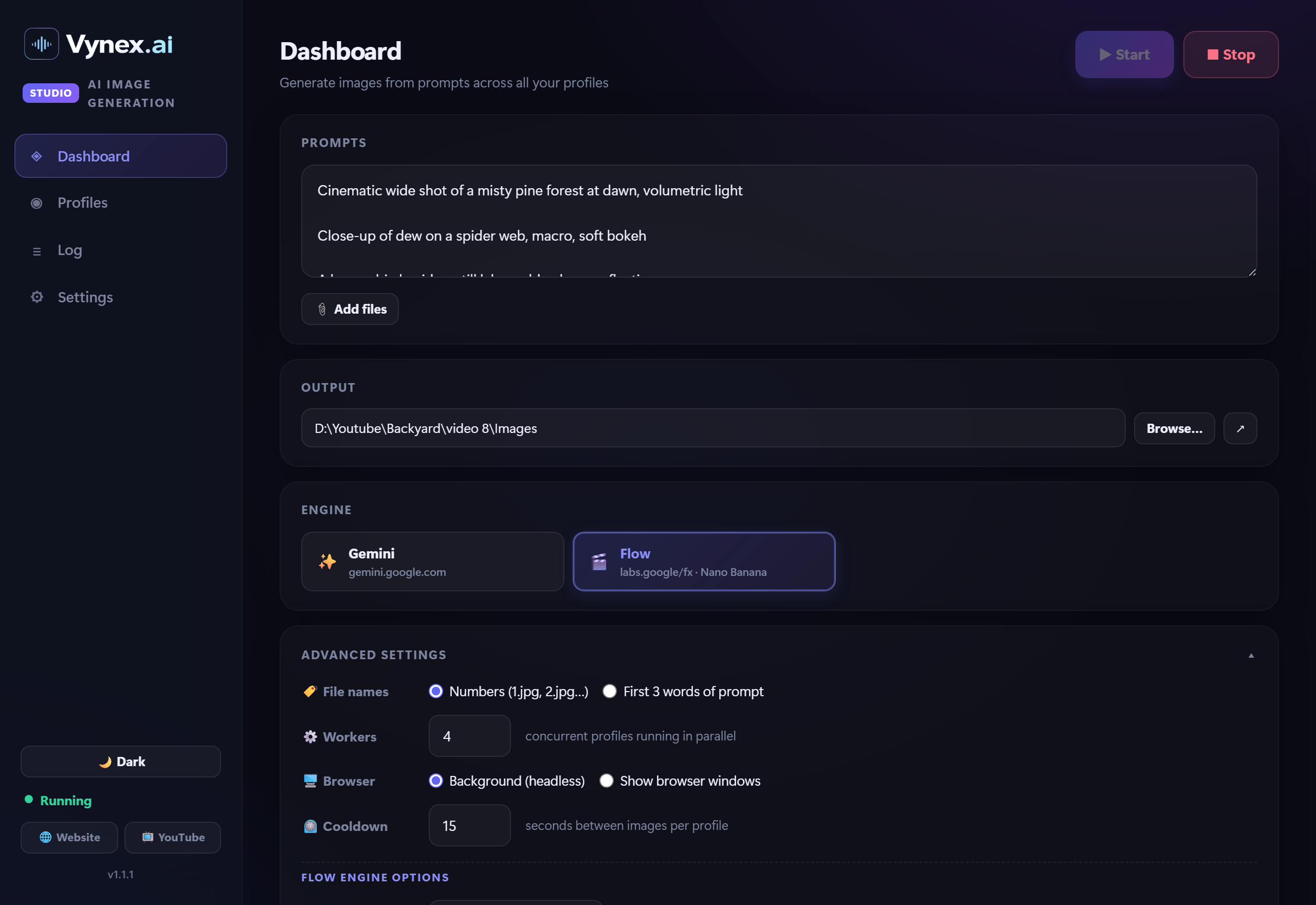
Flow engine selected with advanced settings
Flow engine selected — model, aspect ratio, and output count live in Advanced settings.
Usage guide

From prompts to a folder of images in 6 steps

No setup scripts, no config files — everything is in the app.

1

Add your accounts

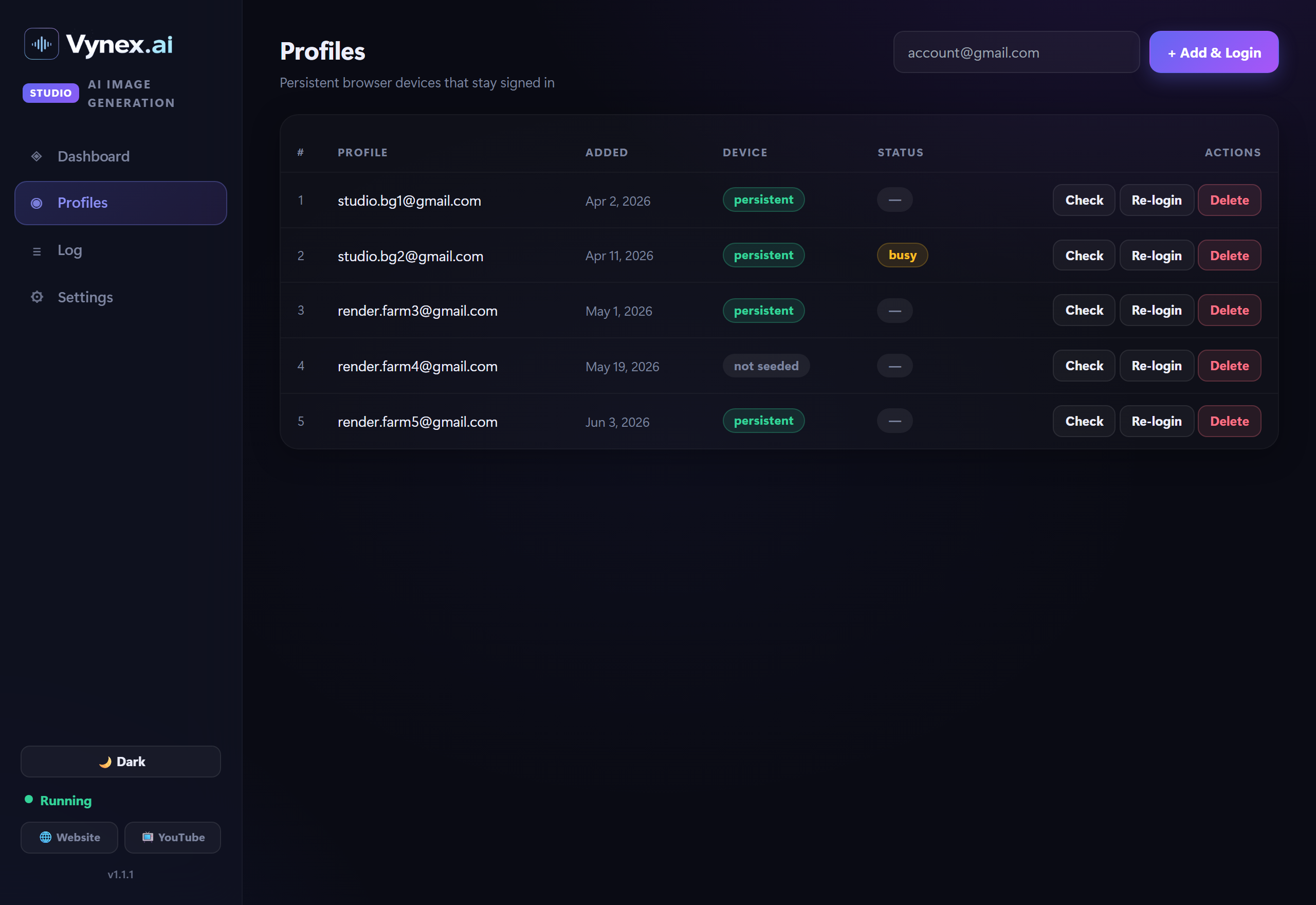
Open the Profiles tab, type a Google address and click Add & Login. A browser window opens — sign in once and close it. The profile becomes a persistent, signed-in device. Repeat for as many accounts as you want running in parallel.

Profiles tab
2

Add your prompts

On the Dashboard, paste prompts into the box — one per paragraph, as a numbered list, or with Scene tags. Or click Add files to upload .txt / .json prompt files. Vynex Studio parses them all into a queue.

Dashboard prompts
3

Choose output & engine

Pick an output folder (it's remembered between runs) and select your engine — Gemini, Flow, or Flow Video. Open Advanced settings to set file naming, worker count, background vs. visible browsers, cooldown, and each engine's model / aspect / output count.

Engine and advanced settings
4

Start & watch it work

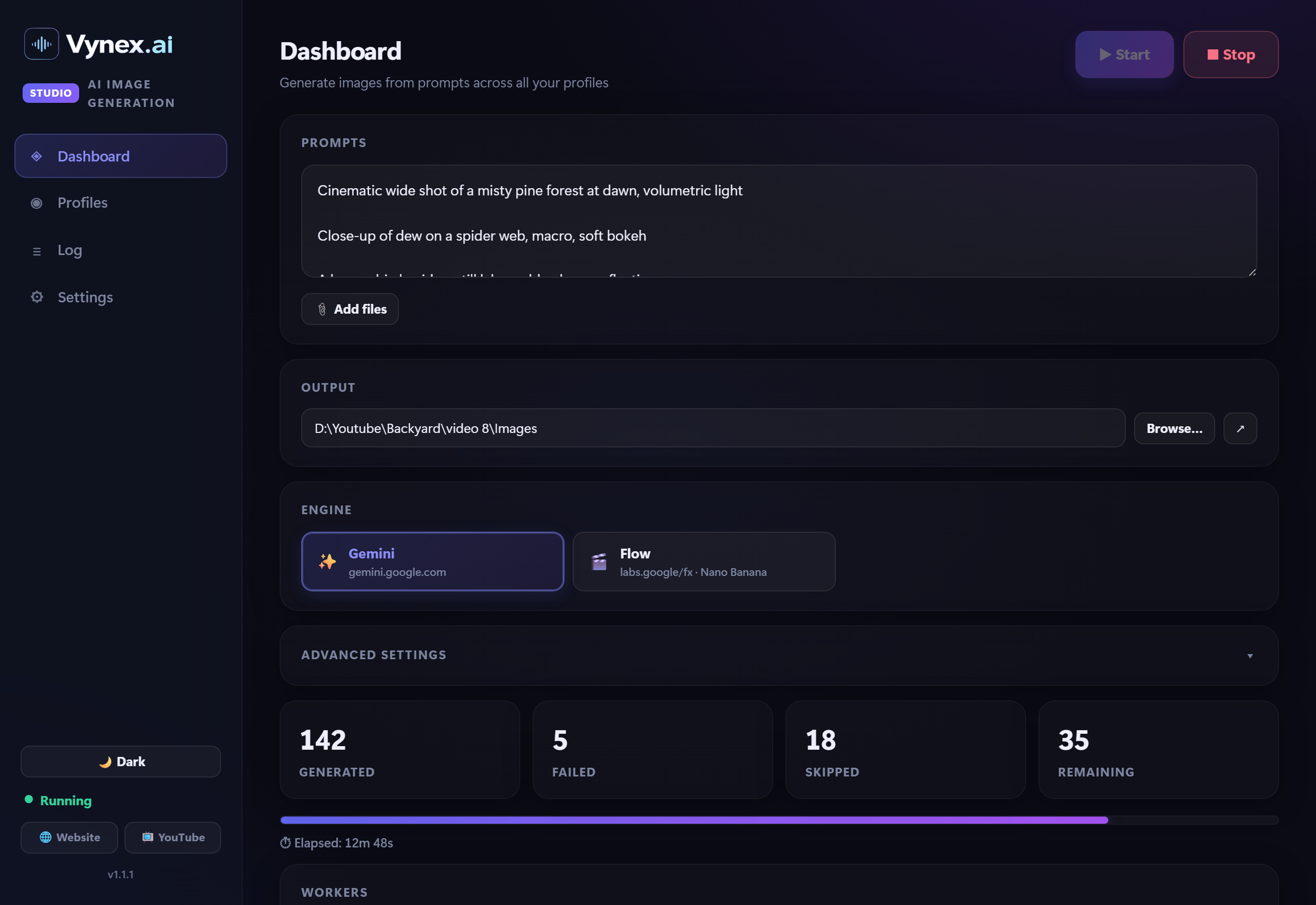
Hit Start, confirm the summary, and the workers spin up. The dashboard shows live Generated / Failed / Skipped / Remaining counts, a progress bar, elapsed time, and a per-worker table with current status (Generating, Downloading, Retrying, Cooldown).

Live dashboard while running
5

Follow the live log

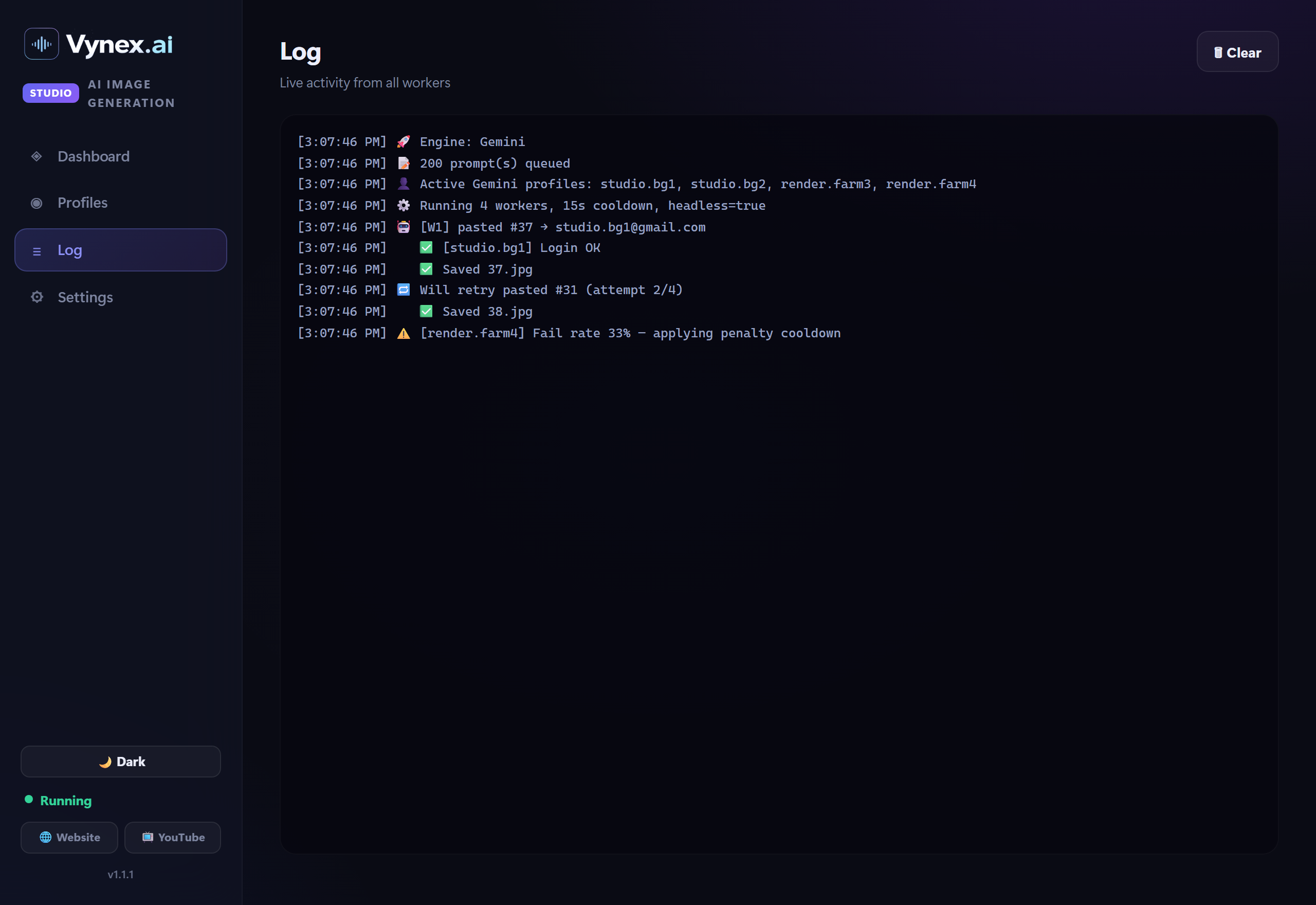
The Log tab streams everything as it happens — which profile took which prompt, saves, retries, and any rate-limit cooldowns. Stop at any time; Stop closes all browsers immediately and re-queues anything in flight.

Live log
6

Track account health

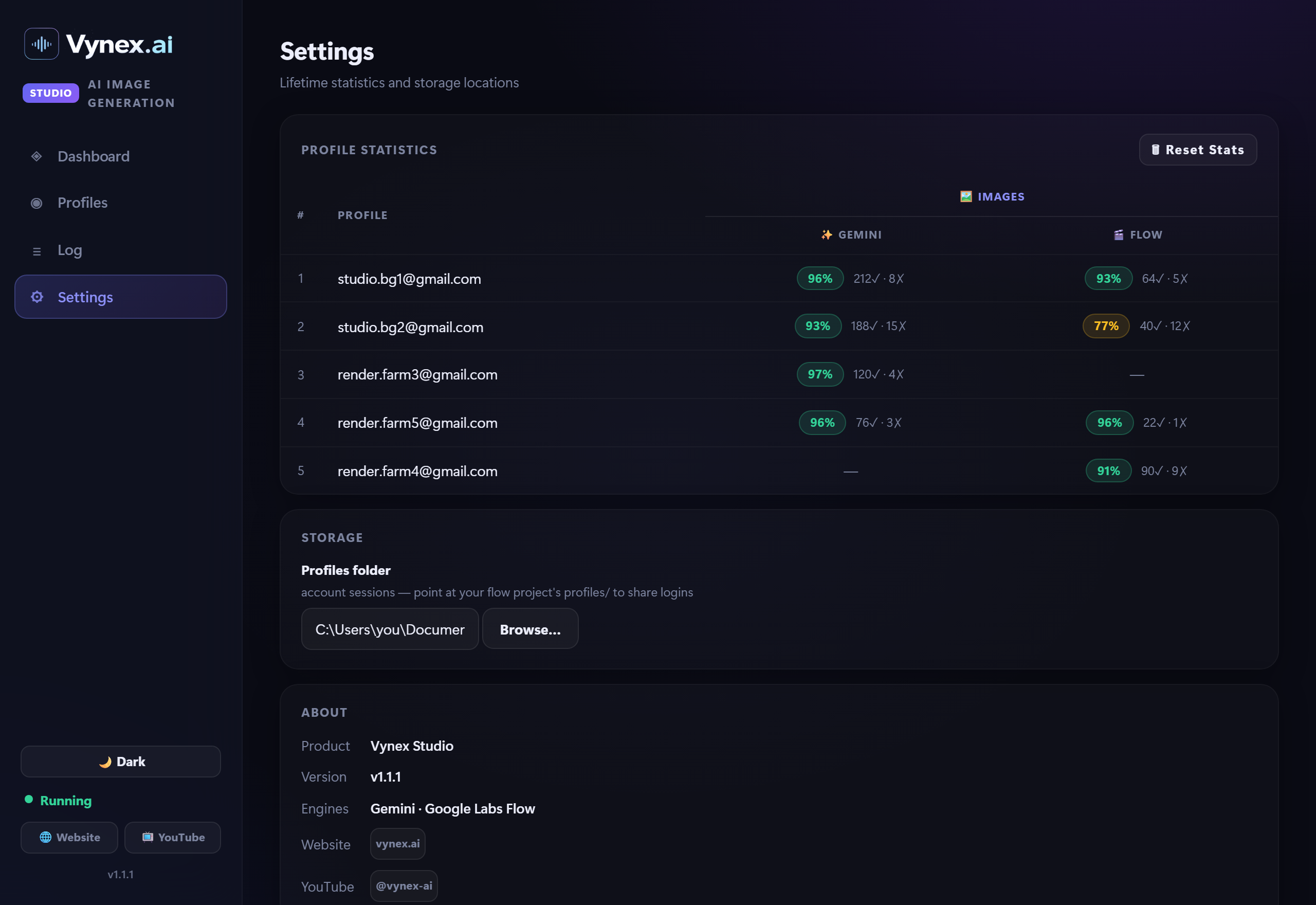
The Settings tab keeps lifetime statistics for every profile, split by engine under a single Images view — generated, failed, and success rate. Spot weak accounts at a glance and re-login or retire them.

Per-engine statistics
Let's Talk

Ready to Build
Your YouTube System?

Book a free 30-minute strategy call. We'll review your goals and match you with the right services.

Book a Free Strategy Call Email Us Directly

We reply within 4 hours  ·  No spam, ever